Workers Comp Calculator
Enter payroll and the rate per $100 for up to four classes, then your X-mod, schedule modification, premium discount and expense constant to see the premium build up step by step.
How to use the Workers Comp Calculator
- Choose a preset if one fits: “NCCI example”, “Credit mod + discount” or “Three classes”. A preset loads example numbers that you can replace with your own.
- In each class row, enter a class code or name. The calculator accepts up to four rows.
- Enter the payroll in dollars for that class.
- Enter the rate per $100 of payroll from your quote. A row with only one of payroll or rate is rejected, so fill in both or clear the row.
- Enter your “X-mod” from the quote. Leave it empty to use 1.00.
- If your quote has a schedule modification, type it as a percent: plus for a debit, minus for a credit. The value must be above -100%.
- Type the premium discount as a percent from the quote’s discount table, from 0 to 100. Leave it at 0 if the quote shows no discount.
- Enter the expense constant as a flat dollar charge per policy, if your quote lists one.
- Read “Estimated premium from your numbers”, “Premium before the X-mod”, “Premium after the X-mod” and “Standard premium”, then read any warnings shown with them.
Everything runs in your browser, and nothing you type is uploaded. The result is an estimate only; get quotes from a licensed insurer or agent.
How is a workers comp premium calculated?
Each class premium equals payroll divided by 100, multiplied by the rate for that class. In other words, each $100 of payroll is multiplied by the rate for the classification (NCCI). The premiums of all classes are then added together. The calculator does not supply class rates, so the rate for each class must come from your quote or rate sheet.
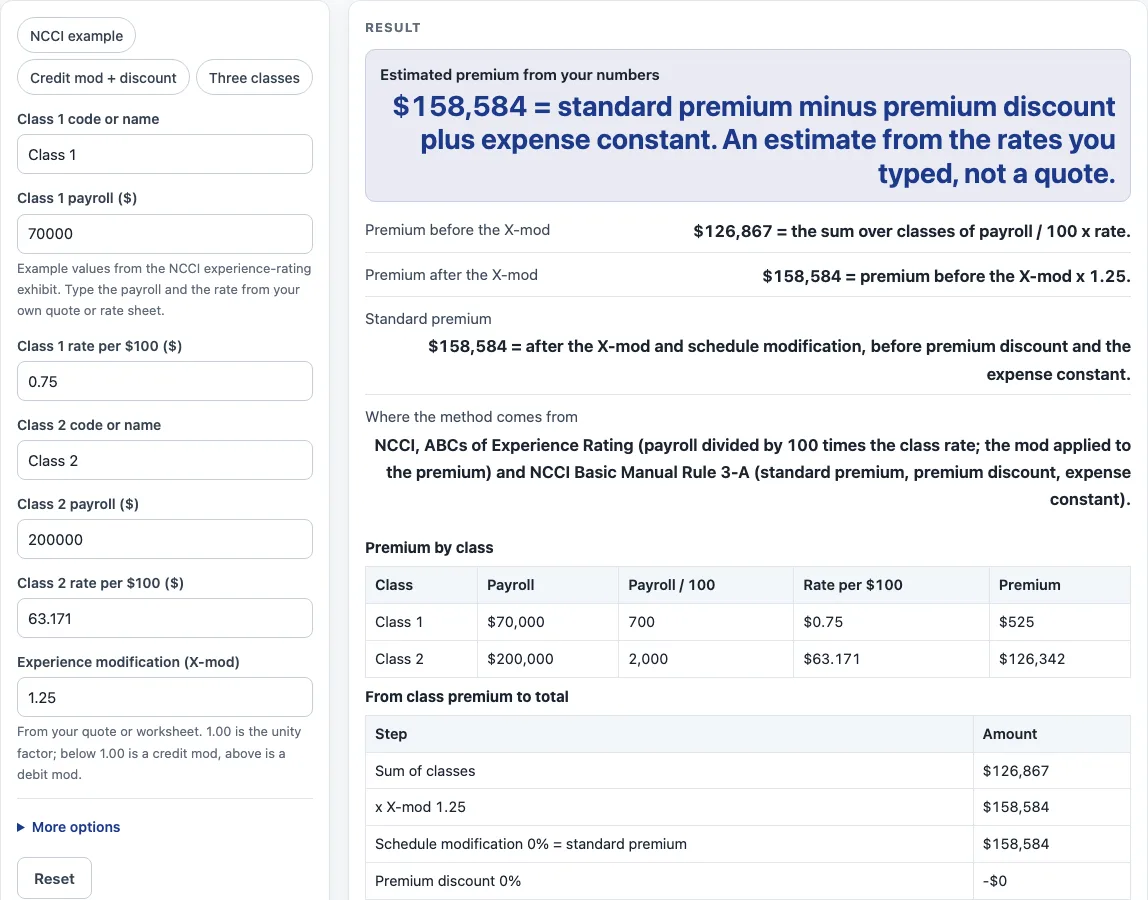
Here is the first worked example, which uses figures from Exhibit F of NCCI’s “ABCs of Experience Rating”. $70,000 at $0.75 per $100 is $525. $200,000 at $63.171 per $100 is $126,342. The sum of the two classes is $126,867. A third class can be added the same way. For example, $50,000 at $2.40 per $100 is $1,200, and with an X-mod of 1.00 the combined total becomes $128,067.
How do the X-mod, schedule modification and discount change the total?
The X-mod, short for experience modification, multiplies the summed premium. The tool shows the result as “Premium after the X-mod”. A factor of 1.00 is the unity factor and leaves the premium unchanged. A factor below 1.00 is a credit mod, and a factor above 1.00 is a debit mod (NCCI). An empty X-mod is treated as 1.00. In the first example, an X-mod of 1.25 raises $126,867 to $158,584.
The schedule modification is typed as a percent, plus for debit and minus for credit. It multiplies the modified premium by (1 + percent), and the value must be above -100%. The standard premium is the premium after the X-mod and schedule modification, and before any premium discount (NCCI Basic Manual Rule 3-A, 2013 revision).
The premium discount is a percent of standard premium, taken from the quote’s discount table, and it can be from 0 to 100. The expense constant is a flat dollar charge per policy. It is added after the discount and is not discounted, which matches NCCI’s treatment of it as outside standard premium and outside premium discount and experience rating. The total is calculated as follows:
Total = standard premium - premium discount + expense constant
Take the second worked example. The same classes with an X-mod of 0.85, a schedule modification of -10%, a 5% discount and a $160 expense constant give $92,361.
NCCI Rule 3-A lists experience rating and schedule rating as elements of standard premium but does not state an order between them. This page applies them as multipliers, so the product does not depend on order. The exact order of schedule modification and discount varies by state and carrier, so check your quote for how it is applied.
Sources (checked 15 October 2026): ncci.com · ncci.com
Worked examples
| Input | Result |
|---|---|
| 2 class(es), X-mod 1.25 | $158,584 = standard premium minus premium discount plus expense constant. An estimate from the rates you typed, not a quote. |
| 2 class(es), X-mod 0.85 | $92,361 = standard premium minus premium discount plus expense constant. An estimate from the rates you typed, not a quote. |
| 3 class(es), X-mod 1 | $128,067 = standard premium minus premium discount plus expense constant. An estimate from the rates you typed, not a quote. |
| 1 class(es), X-mod 1 | $480 = standard premium minus premium discount plus expense constant. An estimate from the rates you typed, not a quote. |
Calculated by the tool above; open it with the same values to see each step.
Frequently asked questions
Is the result from the workers comp calculator a real quote?
No. The result is an estimate only, based on the numbers you type; get quotes from a licensed insurer or agent.
Where do I find the class rates?
The page lists no class rates. Use the rate per $100 of payroll from your own quote or rate sheet.
What happens if I leave the X-mod empty?
An empty X-mod is treated as 1.00, so the summed premium is not changed by it.
Does this workers compensation insurance cost calculator include state surcharges or officer payroll caps?
No. Officer and owner payroll caps, the overtime premium exclusion, state surcharges and the exact order of schedule modification and discount vary by state and carrier, and they are not computed here. Check your quote for these items.
Why does a warning mention credit or debit?
When the X-mod is not 1.00, the warning states whether the mod is a credit or a debit. A value below 1.00 is a credit and a value above 1.00 is a debit.
Is anything I type sent anywhere?
No. The calculator runs in your browser, nothing is uploaded, there is no sign-up, and it is free to use.
Related tools
- Business Insurance Costs: use it to find every business insurance cost tool in one place.
- Workers Comp Insurance Cost: use it for a cost overview of workers’ compensation coverage.
- Small Business Insurance Cost: use it when you are comparing the cost of insurance across several coverage types for a small business.
- General Liability Insurance Cost: use it to look at the cost of general liability coverage.
- Commercial Auto Insurance Cost: use it to look at the cost of commercial auto coverage.
- BOP Insurance Cost: use it to look at the cost of a business owner’s policy.
- Commercial Property Insurance Cost: use it to look at the cost of commercial property coverage.
- Cyber Liability Insurance Cost: use it to look at the cost of cyber liability coverage.
- Errors and Omissions Insurance Cost: use it to look at the cost of errors and omissions coverage.