Umbrella Insurance Calculator
Enter your assets, the amount you list as out of reach, and your home and auto liability limits to see the exposure above them in $1,000,000 steps. No price is shown.
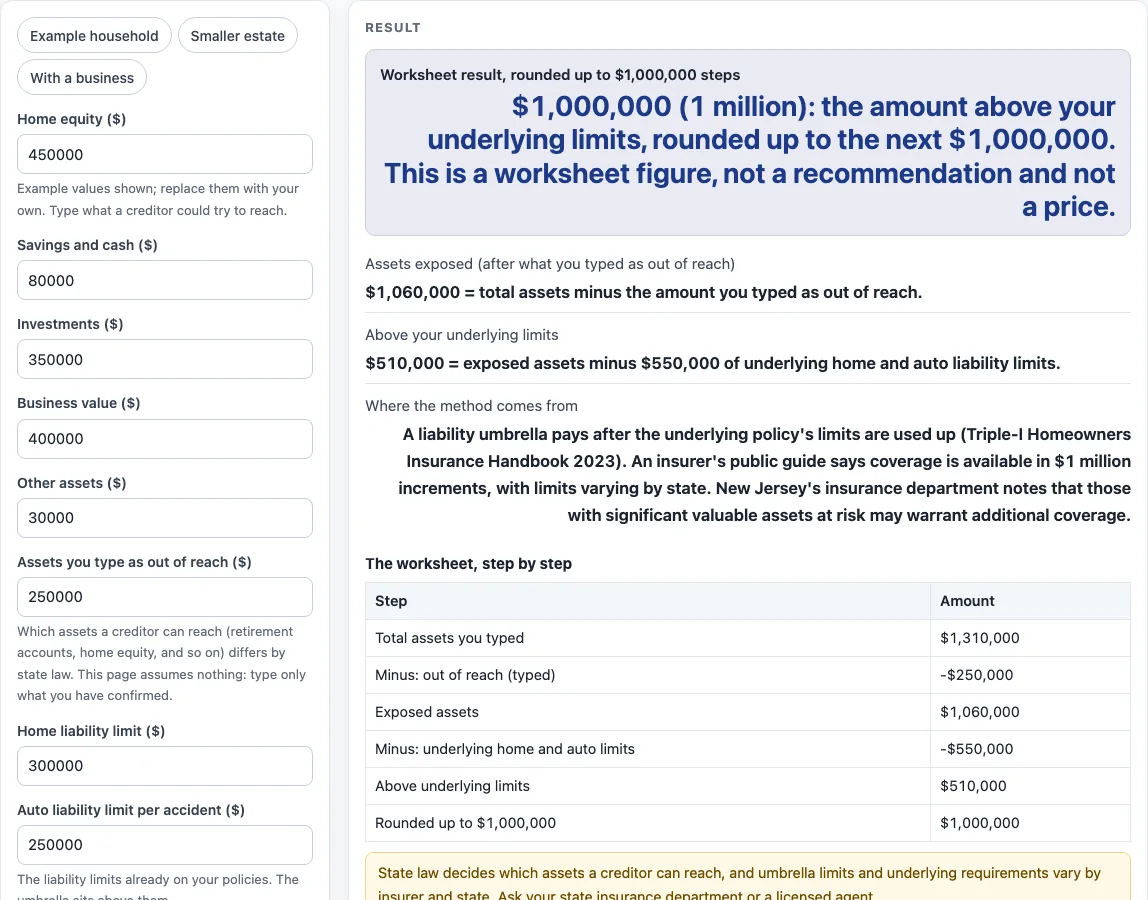
How to use the umbrella insurance calculator
- Choose a preset if you want a starting point: “Example household,” “Smaller estate,” or “With a business.” Otherwise, leave the fields empty and start with your own numbers.
- Type the value of each asset you have: “Home equity”, “Savings and cash”, “Investments”, “Business value” and “Other assets”. The example household totals $1,310,000.
- Type the “Assets you type as out of reach” amount. The page does not decide which assets are protected, because state law differs.
- Type your “Home liability limit” and your “Auto liability limit per accident”. The example uses $300,000 and $250,000.
- Look for the warning if your home limit is below $300,000. Triple-I says most companies require at least $300,000 of underlying home liability for an umbrella.
- Check the exposed assets figure. It equals total assets minus the out-of-reach amount, and it never goes below zero. The example gives $1,060,000.
- Check “Above your underlying limits”. It equals exposed assets minus your home and auto limits, and it never goes below zero. The example gives $510,000.
- Read the “Worksheet result, rounded up to $1,000,000 steps”. The example gives $1,000,000.
- Use the step table to follow each line from total assets to the rounded figure. Read the warning on every result before you rely on the number.
Presets only fill in example values, so you can change any field afterward. The page shows no price at any step.
What does the umbrella insurance calculator subtract first?
The page subtracts the out-of-reach amount from total assets to get exposed assets. In the example, $1,310,000 minus the $250,000 out-of-reach amount gives $1,060,000 of exposed assets. The result never goes below zero.
The page does not assume which assets are protected, because state law decides which assets a creditor can reach and that rule varies by state.
Why do underlying limits come first?
The Triple-I Homeowners Insurance Handbook (2023) says an umbrella starts to pay after the underlying policy’s liability limits are used up. For that reason, the page subtracts your home and auto liability limits from exposed assets. In the example, $1,060,000 minus $550,000 gives $510,000 above underlying limits.
Some guides subtract nothing for underlying limits and match coverage to net worth. This page shows exposed assets both before and after underlying limits, so you can see each figure.
Why does the result round up to $1,000,000?
Farmers’ public consumer guide (farmers.com, checked 15 October 2026) says coverage is available in $1 million increments up to $10 million, depending on state, and that available limits vary by state. The page rounds the above-limits amount up to the next $1,000,000. An amount that is already an exact multiple stays the same. For example, $1,000,000 stays at $1,000,000, while $1,000,001 becomes $2,000,000. No Triple-I or state page used here states this rule, so the rounding comes from that guide alone. The New Jersey Department of Banking and Insurance says common umbrella policies provide an additional $1 million or more above underlying limits, and that those with significant valuable assets at risk may warrant additional coverage.
A business example shows the full path. A business value of $2,200,000 and an out-of-reach amount of $400,000 give total assets of $3,110,000. Then $3,110,000 minus $400,000 gives $2,710,000 of exposed assets. Subtracting $550,000 of underlying limits leaves $2,160,000, which rounds up to $3,000,000.
Why can the result be $0?
The result is $0 when nothing remains above your underlying limits. In that case, the page shows a message that your limits already equal or exceed the exposed assets you typed. For example, assets of $190,000 with $600,000 of underlying limits give $0.
A $0 result is still only an estimate based on the numbers you entered; get quotes from a licensed insurer or agent.
Sources (checked 15 October 2026): iii.org · farmers.com · nj.gov
Worked examples
| Input | Result |
|---|---|
| Assets $1,310,000, out of reach $250,000 | $1,000,000 (1 million): the amount above your underlying limits, rounded up to the next $1,000,000. This is a worksheet figure, not a recommendation and not a price. |
| Assets $3,110,000, out of reach $400,000 | $3,000,000 (3 million): the amount above your underlying limits, rounded up to the next $1,000,000. This is a worksheet figure, not a recommendation and not a price. |
| Assets $190,000, out of reach $0 | $0: your underlying liability limits already equal or exceed the exposed assets you typed. |
| Assets $1,310,000, out of reach $250,000 | $1,000,000 (1 million): the amount above your underlying limits, rounded up to the next $1,000,000. This is a worksheet figure, not a recommendation and not a price. |
Calculated by the tool above; open it with the same values to see each step.
Frequently asked questions
Is the umbrella insurance calculator free?
Yes, it is free. Everything runs in your browser, and nothing you type is uploaded.
Does the page show a price for business umbrella insurance cost?
No. The page shows no price or premium. Every dollar figure comes from numbers you type, and the result is an estimate only; get quotes from a licensed insurer or agent.
Does the result account for my state’s laws?
No. State law decides which assets a creditor can reach, and limits and requirements vary by insurer and state. The page asks you to enter your out-of-reach amount for this reason.
What happens if my home liability limit is below $300,000?
A warning appears on the result. Triple-I says most companies require at least $300,000 of underlying home liability for an umbrella. The calculation still runs with the number you entered.
Does the result recommend a coverage amount?
No. The result is arithmetic on your own numbers. It is not a recommendation, a quote, or a comparison of insurers.
Why might my result differ from another guide?
Some guides subtract nothing for underlying limits and match coverage to net worth. This page subtracts your underlying limits and shows both the exposed assets figure and the above-limits figure, so the difference is visible in the steps.
Related tools
- Home and Rental Coverage The hub with every home and rental page on this site.
- How Much Homeowners Insurance Do I Need? Use it when you want to think through your home coverage before you check your umbrella numbers.
- How Much Renters Insurance Do I Need? Use it if you rent and want to review your renters coverage instead.
- Life Insurance Calculators The hub with every life insurance page on this site.
- How Much Life Insurance Do I Need? Use it for a worksheet on life insurance amounts.
- Business Insurance Costs The hub for small business insurance cost pages.