Business Insurance Cost for Photographers
Pick a coverage to see the published photographer figure, type a quote to compare, and tick coverages to add up a yearly budget.
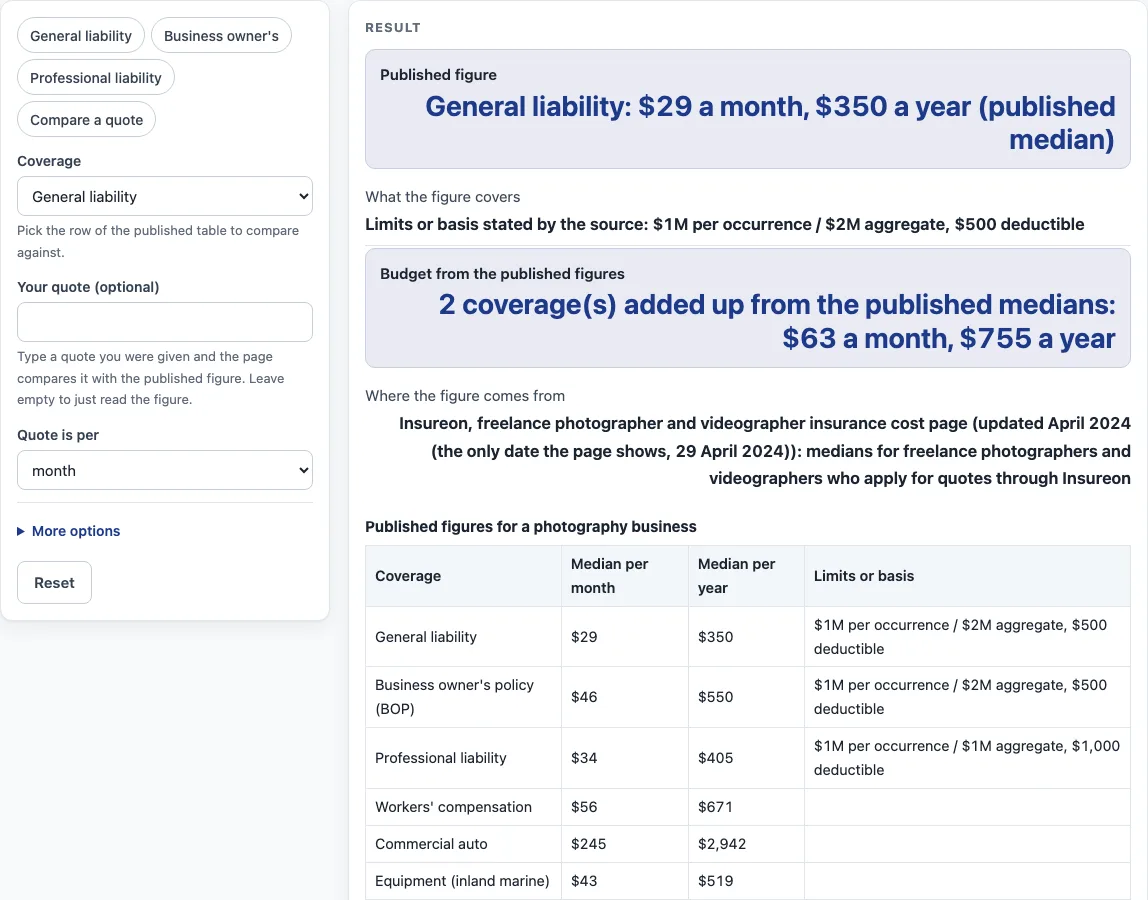
How to use the photographer insurance cost tool
Work through these steps with the controls at the top of the page.
- Open “Coverage”. Pick the row in the published table that fits the cover you want to review: general liability, business owner’s policy (BOP), professional liability, workers’ compensation, commercial auto, or equipment (inland marine).
- Read the published figure. For that row, the result displays the figure per month and per year. Limits appear alongside the figure when the source gives them. Workers’ compensation, commercial auto and equipment rows show figures only.
- Enter a quote, if you have one. Type it into “Your quote (optional)” and set “Quote is per” to month or year, so the tool knows which period it covers.
- Read “Your quote against it”. Here the tool reports how far your quote sits above or below the published figure for the same coverage.
- Open “More options” for extra detail. Enter “Annual revenue (optional)” to see “Share of revenue”, enter “Employees (optional)” to see “Per employee”, and tick the coverages to add to the budget. Both outputs rely on the ticked budget total rather than your quote.
- Repeat for other rows by changing the coverage row and checking each one that interests you.
- Treat every result as an estimate only. A quote for your business comes from a licensed insurer or agent.
All calculations happen in your browser, so nothing you enter is sent anywhere.
What does a published median for photography insurance cost mean?
A published median is the middle value of the figures in a set, so half the values are higher and half are lower. Insureon supplies the figures on this page, which are medians of policy costs for freelance photographers and videographers. According to Insureon, the median drops outlier high and low premiums, and no sample size appears on the page. The only date listed is 29 April 2024. Search-result text for other Insureon photography pages gave a BOP of $54 and $42 a month and professional liability of $42 and $33 a month, so sources vary. This page’s figures come from the freelance photographer page, opened on 15 October 2026.
Why do the monthly and yearly figures not match exactly?
Each coverage appears in the source with a monthly and a yearly figure, and the tool displays both unchanged. For general liability, the figures are $29 per month and $350 per year. Multiplying $29 by twelve gives $348, a $2 shortfall against the published yearly figure. Monthly quotes are multiplied by 12 before being checked against the yearly figure.
How does the tool compare a quote with the published figure?
Gaps are shown as a percentage above or below the published yearly figure, once a monthly quote has been converted to a yearly amount. Share of revenue expresses the ticked yearly budget total as a percentage of the annual revenue you type in. Per-employee cost splits that yearly total across the employee count you provide. Results reflect only what you enter, so treat them as rough estimates and request quotes from a licensed insurer or agent.
Why is a bundle price not the sum of the separate figures?
Adding separate medians does not produce a bundle price. Combining the $350 general liability yearly figure with the $405 professional liability yearly figure produces $755, yet that sum does not represent a bundle. Insureon also names what moves each coverage’s price: coverage limits, business size, business property value, the photography services offered, claims history, number of employees, number and value of vehicles and driving records, and camera equipment value.
What do the limits and deductibles in the table mean?
In the “Limits or basis” column, general liability appears at $1M per occurrence and $2M aggregate with a $500 deductible, while professional liability sits at $1M per occurrence and $1M aggregate with a $1,000 deductible. A business owner’s policy (BOP) carries $1M and $2M limits and a $500 deductible, matching general liability. Insureon states these limits; the tool does not recommend any limit or deductible.
Sources (checked 15 October 2026): insureon.com
Worked examples
| Input | Result |
|---|---|
| General liability | 2 coverage(s) added up from the published medians: $63 a month, $755 a year |
| General liability, quote $40 per month | Your quote of $40 a month ($480 a year) is 37.1% above the published median of $29 a month. |
| Business owner's policy (BOP), revenue $120,000 | 2 coverage(s) added up from the published medians: $63 a month, $755 a year |
| General liability, revenue $150,000 | 2 coverage(s) added up from the published medians: $75 a month, $900 a year |
Calculated by the tool above; open it with the same values to see each step.
Frequently asked questions
Is the figure on this page a quote?
No. Each figure is a published median from Insureon’s freelance photographer and videographer page, which is dated 29 April 2024 and nothing else. This tool offers no estimate of its own and issues no quote.
Does the tool tell me which coverage to buy?
No. Published figures appear here, set beside a quote you enter yourself. A licensed insurer or agent issues quotes, and the result is an estimate only.
Where do the figures come from?
The source is Insureon’s freelance photographer and videographer insurance cost page. Figures shown here were copied from it on 15 October 2026.
Why is no sample size shown?
Insureon’s page leaves out a sample size, which means this tool has none to report. These are medians, and according to the page, unusually high and low premiums are set aside.
Are my numbers uploaded anywhere?
No. All calculations happen in your browser. Nothing on the page requests contact details, sells leads, or refers you to insurers.
Does the page cover other kinds of business?
These numbers apply to photography only. Other trades are covered on related pages, listed below.
What factors change the cost?
The factors named on Insureon’s page are coverage limits, business size, business property value, the photography services offered, claims history, number of employees, number and value of vehicles and driving records, and camera equipment value.
Related tools
- Insurance cost by trade: the hub listing every trade page with published figures.
- Business insurance costs: the hub for coverage-type pages such as general liability and workers’ comp.
- Hair salon insurance cost: a good pick for salon owners who want to check a quote against published figures.
- Cleaning Business Insurance Cost: for cleaning businesses that need the published figures for their trade.
- Contractor Insurance Cost: contractors can open this page to see published figures for their trade.
- Daycare Insurance Cost: running a daycare? Compare your quote with the published figures here.
- Electrician insurance cost: where electricians find the published figures for their trade.
- Food Truck Insurance Cost: a food truck operator can hold a quote against the published figures on this page.