How Much Life Insurance Do I Need?
Type your income, debts, mortgage, education fund and what you already have; the page works out the needs-based, DIME and income-multiple totals and the gap left after existing coverage and savings.
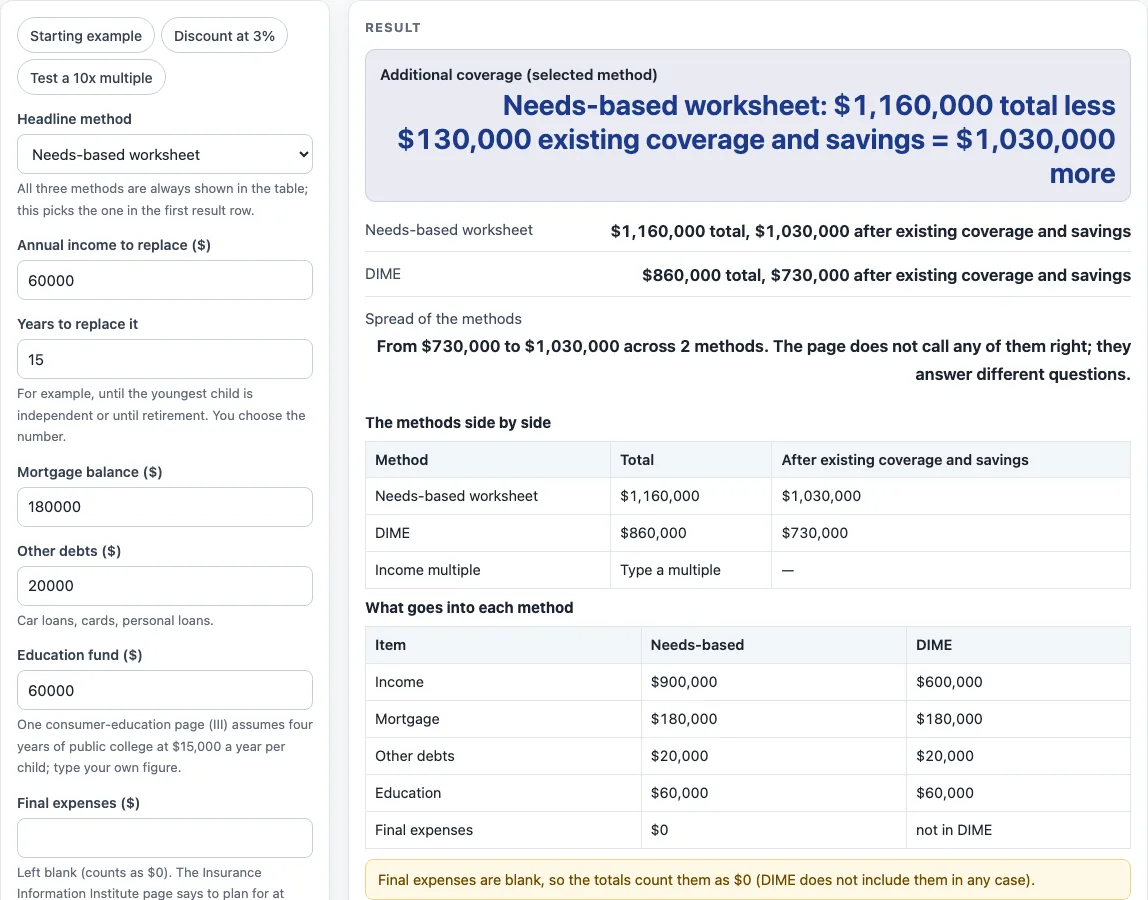
How to use the Life Insurance Needs Calculator
- Choose a “Headline method”: needs-based, DIME or income multiple. The headline method sets the additional coverage figure at the top of the results. All three methods still appear.
- Type the “Annual income to replace” and the “Years to replace it”. Both must be above zero.
- Enter the “Mortgage balance”, “Other debts” and “Education fund”.
- Enter “Final expenses”. This box is blank by default, and a blank box is counted as $0.
- Enter “Existing life insurance” and “Liquid savings” so the tool can subtract them from each total.
- Open “More options” to set a “Discount rate for income” in percent a year (default 0), “DIME: years of income” (default 10) and an “Income multiple (times income)” (no default). A discount rate of 0 counts income as income times years.
- If you pick the income multiple method as the headline without typing a multiple, an error appears. With another headline method and no multiple typed, a warning appears and the third method is skipped.
- Read the results: the additional coverage for the headline method, the total and the amount after existing coverage and savings for each method, the spread from lowest to highest, and the two tables. Check any warnings before you use the numbers.
Three presets are available: “Starting example”, “Discount at 3%” and “Test a 10x multiple”. Each loads a set of numbers you can change. Everything runs in your browser, and nothing is uploaded.
How much life insurance do I need?
The tool does not give one answer to how much life insurance do I need. It shows three worksheet totals so you can compare them, and the results are estimates from the numbers you type. Each method is a formula, so the result depends on the inputs, the method you choose and the discount rate.
The needs-based total is the present value of the income to replace, plus the mortgage, other debts, education fund and final expenses. With a 0% discount rate, the income part is income times years. Above 0%, it is income x (1 - (1 + r)^-years) / r, where r is the rate as a decimal. Discounting lowers the income part because money received in later years is worth less today. With the default figures, a 3% discount rate and $15,000 of final expenses, the income part is $716,276 and the needs-based total is $991,276.
DIME adds other debts, income times the DIME years, the mortgage and the education fund. Final expenses are not part of DIME. The DIME method used here comes from OneDigital (14 July 2024), which uses ten years of income. The income multiple method is the multiple you type times annual income. There is no default multiple, because the pages read for this site do not give one to rely on.
How are the totals reduced by existing coverage?
Each method’s total is reduced by existing life insurance plus liquid savings. The result is never below $0. This gives the additional coverage the worksheet shows for each method. The tool also shows the spread from the lowest to the highest total, so you can see how far the methods are apart.
Using the default example, the needs-based total of $1,160,000 becomes $1,030,000 after $100,000 of existing coverage and $30,000 of savings. The DIME total of $860,000 becomes $730,000 after the same amounts. The DIME total is $20,000 + 10 x $60,000 + $180,000 + $60,000 = $860,000.
Three warnings can appear. A blank final expenses box is counted as $0. Existing coverage and savings that are at least as large as the selected total will be flagged. With no multiple typed, the third method is skipped and a warning shows. Read the two tables, which show the methods and the parts that make up the needs-based and DIME totals, to check how each number was built.
Sources (checked 15 October 2026): iii.org · onedigital.com · insurance.ky.gov
Worked examples
| Input | Result |
|---|---|
| Income $60,000 for 15 years, Needs-based worksheet | $1,030,000 more than existing coverage and savings |
| Income $60,000 for 15 years, DIME | $730,000 more than existing coverage and savings |
| Income $60,000 for 15 years, Needs-based worksheet | $861,276 more than existing coverage and savings |
| Income $60,000 for 15 years, Income multiple | $600,000 more than existing coverage and savings |
Calculated by the tool above; open it with the same values to see each step.
Frequently asked questions
Frequently asked questions
Does this tool tell me which amount to buy?
No. The tool adds up three published worksheet methods and shows the results. The numbers are estimates from what you type, not a quote and not advice. Ask a licensed agent or advisor about your own situation.
What does DIME stand for, and what does it include?
DIME is a worksheet method that adds other debts, income times the DIME years, the mortgage and the education fund. The tool uses ten years of income by default, as in the OneDigital (14 July 2024) source. You can change the number of years under “More options”.
Why are final expenses left out of DIME?
Under the DIME method used here, final expenses are not part of the total. They are part of the needs-based total only. If you want them in the needs-based result, type them in “Final expenses”.
Why is there no default income multiple?
The pages read for this site do not give a multiple to rely on, so the tool leaves the box empty. Type a multiple under “More options” if you want the income multiple method to run. Without one, the method is skipped and a warning shows; if it is the headline method, an error appears instead.
What does a discount rate do?
A discount rate above 0% lowers the income part of the needs-based total, because later income is worth less today. A rate of 0% counts income as income times years. The tool does not accept a discount rate above 30%.
Is my information sent anywhere?
No. Everything runs in your browser, and nothing is uploaded. The tool is free.
Related tools
- All Life Insurance Calculators: The hub with every life insurance page on this site.
- Life Insurance Cost Calculator: Use it when you want to look at the cost side of a policy alongside the coverage estimate.
- Mortgage Life Insurance Calculator: Use it when your main question is about covering a mortgage balance.
- Term Life Insurance Calculator: Use it when you are looking at coverage for a fixed number of years.
- Whole Life Insurance Cost Calculator: Use it when you are looking at the cost of permanent coverage.
- Home and Rental Coverage: Worksheets for homeowners, renters and landlords.