Life Insurance Cost Calculator
Type the premium and coverage from your quotes; the page scales a quote to another amount, compares quotes per $1,000 and totals them over the term, and shows what other payment modes add.
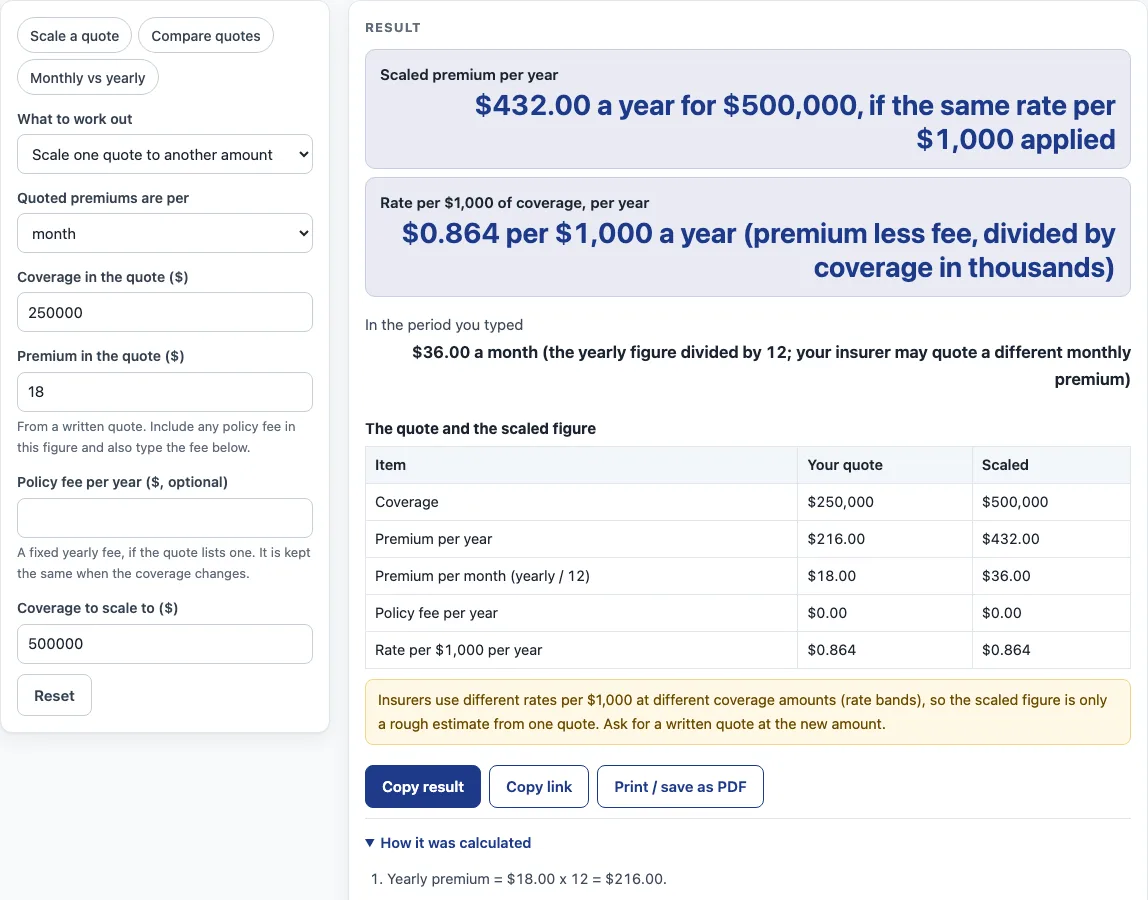
How to use the life insurance cost calculator
- Under “What to work out”, choose “Scale one quote to another amount”, “Compare two or three quotes” or “Compare ways of paying”.
- For scaling, enter “Coverage in the quote” and “Premium in the quote”. Set “Quoted premiums are per” to month or year to match the quote.
- Optionally enter a “Policy fee per year”, only if your quote lists one.
- Enter “Coverage to scale to”. Read the scaled premium.
- For comparing, enter the “Term of the quotes (years)” as a whole number. Then enter coverage and premium for quotes 1 and 2, and for quote 3 if you have one.
- Read the yearly premium, the cost per $1,000 a year and the total over the term for each quote, and the difference in cost per $1,000 between quote 2 and quote 1.
- For payment modes, type at least one of the quoted yearly, every 6 months, every 3 months or monthly premiums.
- Read the total per year for each mode, the extra against the yearly premium (or against the lowest yearly total if no yearly premium is typed), and the implied nominal and effective rate of each mode.
- An error means a premium is zero, the policy fee is not smaller than the yearly premium, fewer than two quotes were typed, a quote has only coverage or only premium, or no payment-mode premium was typed.
Three presets load example numbers: “Scale a quote”, “Compare quotes” and “Monthly vs yearly”. Everything runs in your browser.
What is the formula for cost per $1,000?
The cost per $1,000 is the yearly premium divided by the coverage in thousands. In scale mode, the page first removes any yearly policy fee, so the rate is (yearly premium - yearly fee) / (coverage / 1,000). Using the default example, $18 a month is $216 a year, and for $250,000 that is $0.864 per $1,000. With a $60 yearly fee, the rate becomes ($216 - $60) / 250 = $0.624 per $1,000.
To find a new premium, the page multiplies the rate by the new coverage in thousands and adds the fee back: rate x new coverage / 1,000 + fee. At $500,000 with the $60 fee, that is $312 + $60 = $372. Without a fee, $500,000 gives $432.00 a year, which is $36.00 a month when the yearly figure is divided by 12.
That monthly figure is not the same as a quoted monthly premium. Insurers use rate bands, so a scaled premium is only a rough estimate of one quote. A new quote for $500,000 may be priced differently.
Compare mode uses the same cost per $1,000, then multiplies by the term to get a total. In the default example over 20 years, quote 1 is $250,000 at $216 a year, which is $0.864 per $1,000 and $4,320 in total. Quote 2 is $500,000 at $360 a year, which is $0.720 per $1,000 and $7,200 in total. Quote 2 is 16.7% less per $1,000. Its total is higher because it covers more, so the per $1,000 figure puts the two on the same footing. This is an estimate only; get quotes from a licensed insurer or agent.
How is the implied rate for each payment mode found?
The implied rate is the interest rate that makes the installments equal the yearly premium, counting each payment at the start of its period. The page solves yearly premium = installment x (1 + v + … + v^(n-1)), where v = 1/(1+j), j is the rate per period, and n is the number of payments a year. It finds the value of j that satisfies this equation.
Once j is known, the nominal rate is n x j, and the effective rate is (1+j)^n - 1. The default example uses a yearly premium of $1,000 and a monthly premium of $90. That makes $1,080 a year, which is $80.00 more (8%) than the yearly premium, and about 17.18% nominal. If an installment costs no more than the yearly premium, the rate is zero, and the page gives no rate.
Western & Southern (11 July 2025) says paying monthly may mean higher total premiums, but it gives no figure. The page uses only the premiums you type, so it cannot show how large that difference is for any particular policy.
Sources (checked 15 October 2026): westernsouthern.com · insurance.ky.gov
Worked examples
| Input | Result |
|---|---|
| $250,000 quoted at $216.00 a year, scaled to $500,000 | $432.00 a year at the same rate per $1,000 |
| $300,000 quoted at $240.00 a year, scaled to $750,000 | $592.50 a year at the same rate per $1,000 |
| 2 quotes over 20 years | $0.864 against $0.720 per $1,000 a year |
| 4 payment mode(s) typed | reference $1,000.00 a year |
Calculated by the tool above; open it with the same values to see each step.
Frequently asked questions
Does this life insurance premium calculator check rates for my age or health?
No. The page holds no rate table and does no age or health pricing. It works only with the coverage and premiums you type. For a premium that reflects your own details, ask a licensed agent or advisor.
Why does a scaled premium differ from a new quote?
Insurers use rate bands, so the price per $1,000 can change as coverage changes. The scaled premium is a rough estimate based on one quote, and the insurer’s own figure for the new coverage may be different.
Can I compare quotes that have different terms?
Compare mode uses one term in whole years for all quotes. Enter the same term for each quote so the totals are comparable; the page also cannot see differences in policy type or health class.
What if a payment mode shows no implied rate?
If a payment mode costs no more than the yearly premium, the page has no extra cost to work with, so it gives no rate.
What do the error messages mean?
The page shows an error when a premium is zero, when a policy fee is as large as the yearly premium, when compare mode has fewer than two quotes, when a quote has only coverage or only premium, or when no payment-mode premium is typed. Fix the input and the result will update.
How can I check the calculator before using my own quotes?
Each mode loads with default values, such as $18 a month for $250,000 in scale mode. Compare these outputs with the examples in the explanation above to confirm how the page works before you enter your own figures.
Related tools
- All Life Insurance Calculators: the hub with every life insurance page on this site.
- How Much Life Insurance Do I Need?: use it for a separate look at coverage amounts, since this page works only with the quotes you type.
- Mortgage Life Insurance Calculator: use it when your policy is linked to a mortgage.
- Term Life Insurance Calculator: use it when your quote is for a term policy.
- Whole Life Insurance Cost Calculator: use it when your quote is for a whole life policy.
- Home and Rental Coverage: worksheets for homeowners, renters and landlords.