How to Read a Certificate of Insurance
Work through the certificate in the order a reviewer would: tick each step, see what it tells you and what it cannot, then print the checklist.
How to use the review checklist
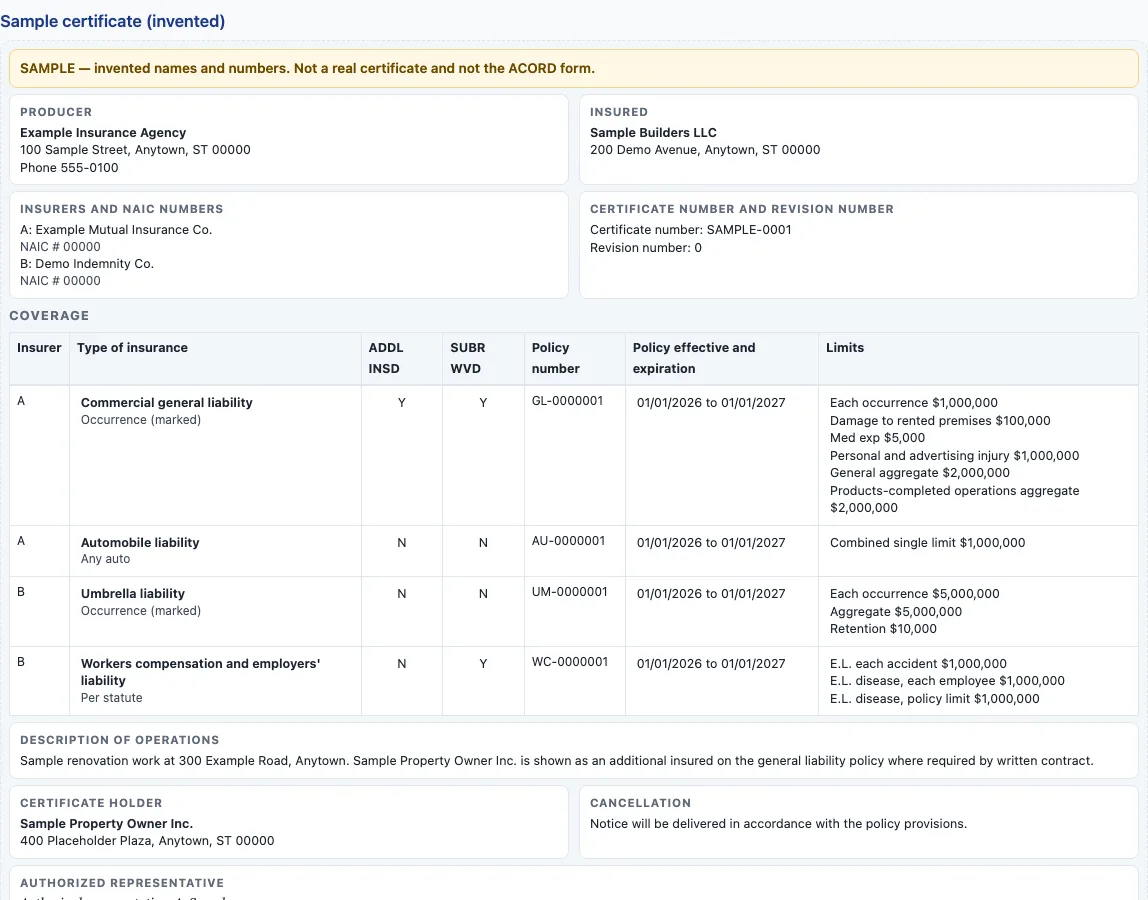
- Open the sample certificate at the top of the page. It is collapsed under the label “Sample certificate (invented)”, so expand it first.
- Start with step 1, “The insured’s name matches the contracting party”. Compare the insured box with the party named in your contract, then tick the box.
- Press “Show in the sample” on any step to highlight the matching parts of the sample.
- Open “Why this matters” to read the reason for the step and the note on what the certificate cannot tell you.
- Work through steps 2 to 11 in order. Tick each one only after you have checked the matching part of your own certificate against your contract.
- Watch the progress count, for example “3 of 11 steps”, to see how far you have got.
- Press “Reset” to clear every tick and start again.
- Press “Print checklist” to print the steps with empty boxes, under the heading “Certificate review checklist”.
The tool does not read your own certificate, so keep your certificate and your contract beside the page. When every step is ticked, the page notes that the steps only list what to look at. They do not say whether your certificate meets your contract.
How do you read a certificate of insurance?
Read the certificate as evidence of coverage, not as the policy. The certificate gives evidence that certain general types of insurance coverage and limits have been bought, and the form itself says it is issued as a matter of information only. The standard ACORD 25 layout runs from the producer and the insured, through insurers A to F with their NAIC numbers, to a coverage table with policy numbers, policy dates and limits. It then ends with a description box, the certificate holder, a cancellation box and the authorized representative’s signature. The sample on the checklist uses the same parts, with invented names and numbers.
What order should I check a certificate in?
Start with the insured box and the policy dates, because they tell you whose policies these are and whether they run for the length of the work or lease. The insured should match the contracting party. One city’s checklist asks for the contracting party’s full name as the insured and for policies that are current. Next, compare each coverage row and its limits with what your contract lists. Then look at the ADDL INSD and SUBR WVD columns, which are statements on the certificate that additional insured status or a waiver of subrogation applies to a row. Finish with the holder box, the cancellation box and the signature.
What can a certificate not tell me?
A certificate is not the policy, and it cannot change the policy. It gives nobody rights beyond what the policy provides. A certificate may not warrant that the policy meets the insurance or indemnification requirements of a contract, and naming a contract number on it does not do that. Notice of cancellation follows the policy: a person is entitled to notice only if the policy or an endorsement gives that right. For endorsement wording, exclusions and conditions, ask for the endorsement or the policy page. State law varies. The NCOIL certificate act is a model for state legislatures, not a law in every state.
Sources (checked 16 October 2026): IRMI glossary: certificate of insurance · NCOIL Certificates of Insurance Model Act · Printed text of a blank ACORD 25, hosted by the National Park Service · City of San Diego insurance checklist
Frequently asked questions
What order should I check a certificate in?
Start with the insured, the policy dates, the coverage rows and limits, the ADDL INSD and SUBR WVD columns, then the holder, the cancellation box and the signature. This is the order the checklist uses, so a name or date that does not fit your contract shows up early.
What do the ADDL INSD and SUBR WVD boxes mean?
They are columns in the coverage table. A mark in one is a statement on the certificate that additional insured status or a waiver of subrogation applies to that row. The form says the statement does not give rights in place of an endorsement, so ask for the endorsement or the policy page that provides the coverage.
What can a certificate not tell me?
It cannot show the policy’s terms, exclusions or conditions, and it does not show endorsement wording. It also cannot show how much of a limit is left, because the form says the limits shown may have been reduced by paid claims.
Is my certificate uploaded to this page?
No. The checklist works on an invented sample. Nothing you tick or print is stored or sent, so keep your own certificate and your contract beside the page.
Does a certificate show that my contract’s requirements are met?
No. A certificate may not warrant that the policy meets a contract’s insurance or indemnification requirements. Compare each item in your contract with the policy and its endorsements, and read the endorsement terms before you sign.
Related pages on this site:
- Certificate of insurance sample - walk through an invented certificate part by part.
- Certificate checker - check your own certificate in your browser.
- Certificate holder vs additional insured - why a holder name alone is not enough.
- Additional insured endorsement - what to ask for behind ADDL INSD.
- Waiver of subrogation - what SUBR WVD refers to.
- Primary and noncontributory - the wording a contract may ask for.
- Certificates of insurance - the hub for every certificate tool and guide on this site.
- Insurance requirements letter generator - write down the coverage you ask a subcontractor or vendor to carry.