How Much Renters Insurance Do I Need?
Type the replacement value of each room to get a personal property total, then test a loss, a liability limit, living costs while displaced and a depreciation percent.
How to use the Renters Insurance Coverage Calculator
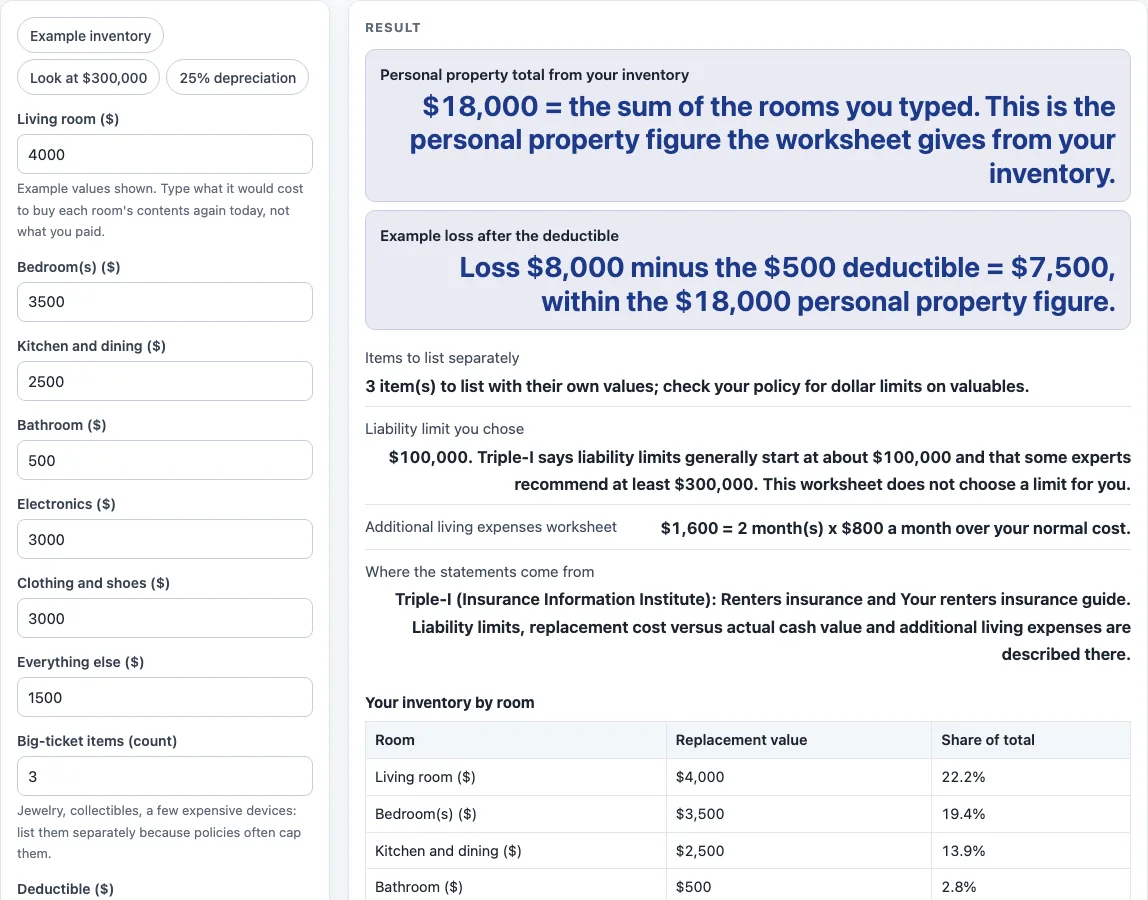
- To see how it works, click the “Example inventory” preset, or “Look at $300,000” or “25% depreciation”. Every value stays editable.
- Type a replacement value in dollars for each of “Living room”, “Bedroom(s)”, “Kitchen and dining”, “Bathroom”, “Electronics”, “Clothing and shoes” and “Everything else”. Replacement value is the cost to buy the same items new today.
- Enter “Big-ticket items (count)” as a whole number. Count jewelry, collectibles and other valuables here. Triple-I says a standard homeowners policy limits what it pays for items such as jewelry, silverware, collectibles and furs.
- Read the inventory total and the table of each room’s share.
- Type an “Example loss to test” and a “Deductible”. The payout is the loss minus the deductible, never below zero, capped at the inventory total.
- Under “Liability limit to look at”, choose $100,000, $300,000 or “Another amount” and type it in “Other liability limit”.
- Enter “Months away from home”, “Monthly cost while displaced” and “Your normal monthly living cost” to estimate additional living expenses.
- Optionally type a “Depreciation % to compare” to compare replacement cost with actual cash value.
Warnings appear when the loss is above the inventory total, when the deductible is at least the loss, or when the displaced monthly cost is below your normal cost. A message rejects entries that are not numbers, are negative, leave every room value empty, use a fractional big-ticket count, use a depreciation above 100, or leave the custom liability empty.
How is the personal property total worked out?
The personal property total is the sum of the seven replacement values you type: six room lines plus “Everything else”. The big-ticket count is not added. The tool reports the sum as the inventory total, which also sets the upper limit on any payout.
The Triple-I renters insurance page says the easiest way to figure out how much coverage to buy is to create a home inventory, so the page is built around that list. Each room value is a number you supply, not a published average. The example values in the tool add up to $18,000: $4,000 for the living room, $3,500 for bedrooms, $2,500 for the kitchen and dining area, $500 for the bathroom, $3,000 for electronics, $3,000 for clothing and shoes, and $1,500 for everything else. The living room is 22.2% of that total, which is the share the table shows.
The payout works in a simple order. First the tool subtracts the deductible from the loss. If the result is below zero, the payout is zero. If it is higher than the inventory total, the payout is capped at the inventory total. For example, an $8,000 loss with a $500 deductible gives $7,500, as long as the inventory total is at least $7,500.
How does depreciation change what a claim pays?
Depreciation is the reduction in value of an item as it gets older. Actual cash value pays replacement cost minus depreciation, while replacement cost does not deduct it, according to Triple-I. The depreciation percent on this page compares those two methods on the same loss.
The formula is loss x (1 - percent) - deductible. At 25% depreciation on an $8,000 loss, the actual cash value calculation gives $5,500, while the replacement cost comparison gives $7,500. That is a $2,000 difference.
The page assumes no depreciation schedule. The percent is a number you type, and in this comparison the deductible is taken after depreciation. Policy wording may order these steps differently, so check the exact terms of any policy you read. The result is a comparison of your numbers, not a statement of what any policy would pay. It is an estimate only; get quotes from a licensed insurer or agent.
Sources (checked 15 October 2026): iii.org · iii.org · iii.org
Worked examples
| Input | Result |
|---|---|
| Inventory $18,000; loss $8,000 | Loss $8,000 minus the $500 deductible = $7,500, within the $18,000 personal property figure. |
| Inventory $18,000; loss $8,000 | Loss $8,000 minus the $500 deductible = $7,500, within the $18,000 personal property figure. |
| Inventory $18,000; loss $30,000 | Loss $30,000 minus the $500 deductible = $18,000, within the $18,000 personal property figure. |
| Inventory $18,000 | $18,000 = the sum of the rooms you typed. This is the personal property figure the worksheet gives from your inventory. |
Calculated by the tool above; open it with the same values to see each step.
Frequently asked questions
How much renters insurance do I need for my belongings?
This page cannot give that number for you. It adds up the replacement values you enter and shows the inventory total, which is the personal property figure for your list. The total is only as complete as the items you include.
What does the liability amount mean on this page?
The liability amount is a limit you pick to look at. The tool offers $100,000, $300,000 or another amount you type. It does not choose one for you.
The Triple-I renters insurance page says limits generally start at about $100,000, and some experts recommend at least $300,000.
Is $500,000 a typical renters insurance limit?
No source used for this page names $500,000 as a typical renters limit. Some older material and secondary sites mention it, so the tool includes it only as an amount you can type in the custom field.
How is additional living expenses calculated?
Additional living expenses equal months away x (monthly cost while displaced - normal monthly cost). Triple-I says policies generally reimburse the difference, not the full cost of living elsewhere. In the example, 2 months at $2,300 compared with $1,500 normal costs gives $1,600.
If the displaced monthly cost is below your normal cost, the extra cost is zero and a warning appears.
Why are jewelry and collectibles listed separately?
Triple-I’s homeowners handbook (2023) notes that a standard policy limits what it pays for items such as jewelry, silverware, collectibles and furs. The big-ticket count reminds you to list those items separately so they are not missed in the room totals. The tool counts them as a whole number only and does not assign them a value.
Are the results a quote?
No. The page gives no premium, no quote and no insurer product. Every figure is arithmetic on the numbers you type. Every figure is an estimate only; get quotes from a licensed insurer or agent.
Related tools
- Home and Rental Coverage — The hub with every home and rental page on this site.
- How Much Homeowners Insurance Do I Need? — Use this when you own your home and want to think through the coverage questions for that property.
- Umbrella Insurance Calculator — Use this when you want to explore coverage that sits above your other liability limits.
- Life Insurance Calculators — The hub with every life insurance page on this site.
- How Much Life Insurance Do I Need? — Use this for a worksheet on life insurance amounts.
- Business Insurance Costs — The hub for small business insurance cost pages.