Hair salon insurance cost
Pick a coverage to see the published figure, type a quote to compare, and tick coverages to add up a yearly budget.
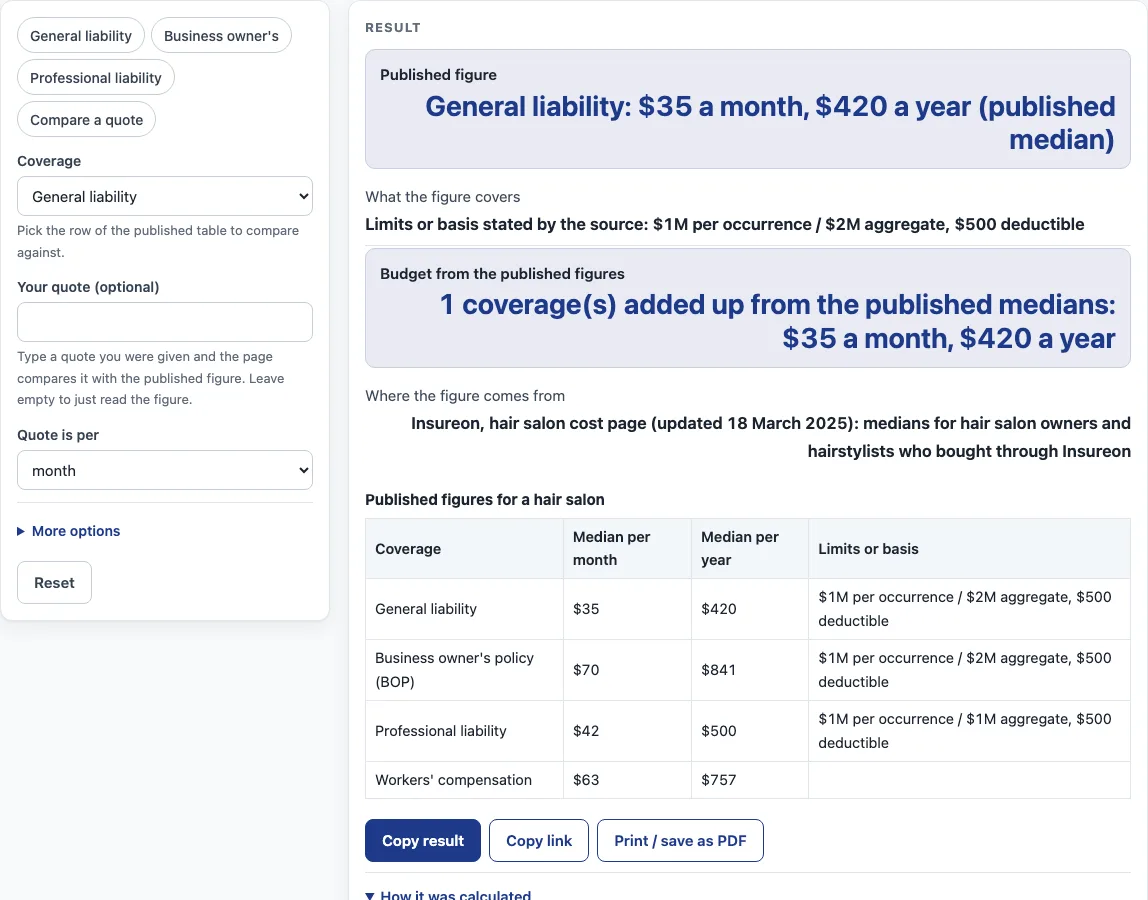
This page answers the query hair salon insurance cost by showing the published figures for hair salon coverage and comparing them with a quote you type in. The figures come from Insureon’s hair salon cost page, updated 18 March 2025, and they are medians for hair salon owners and hairstylists who bought through Insureon. For each coverage, the page shows the published figure per month and per year, along with the limits the source states.
The tool runs in your browser. It is free, needs no sign-up, and does not ask for contact details. It does not produce a quote of its own, so every result is an estimate only; get quotes from a licensed insurer or agent.
How to use the Hair Salon Insurance Cost tool
- Find the row in the published table that matches the coverage you want to look at: General liability, Business owner’s policy (BOP), Professional liability, or Workers’ compensation.
- Read the published figure for that row, shown per month and per year. These are published medians from Insureon.
- Check the limits shown for that row. General liability, Business owner’s policy (BOP), and Professional liability each list $1M per occurrence, a $500 deductible, and either $2M or $1M aggregate. The source does not state limits for Workers’ compensation, so none are shown for that row.
- If you have a quote, type it into the quote field and choose “per month” or “per year” so the tool compares like with like.
- Read the result. It shows how far your quote is above or below the published figure.
- If you want more detail, open “More options”. Enter your annual revenue, number of employees, and which coverages to add to the budget. Once typed, the tool shows your share of revenue and the amount per employee.
- Keep in mind that adding separate medians together does not give the price of a bundle. Treat each row as its own figure.
Every result stays on your screen. Nothing you enter is uploaded, so you can change any input and see the result update straight away.
What do the published hair salon figures measure?
The published figures are medians from Insureon’s hair salon cost page, which was updated 18 March 2025. They cover hair salon owners and hairstylists who bought coverage through Insureon. The tool shows them unchanged and adds no estimate of its own. Because the source page is dated 18 March 2025, the figures may be older than those on some other cost pages on this site, so check the date before you rely on them.
Why does the page say median instead of average?
The top of the source’s list calls the figures average monthly costs, but its methodology describes them as medians. A median is the middle value when all the prices are sorted from lowest to highest. This page uses the word “median” throughout and does not call the figures averages.
How does the quote comparison work?
The tool takes the quote you type and sets it against the published figure for the coverage you chose. It turns the quote into a yearly amount and shows the difference from the published yearly figure as a percentage above or below it, or as a match. Choose “per month” or “per year” to match how your quote is written, so a monthly quote is not set against a yearly figure. The result also repeats the quote and the published median as monthly amounts.
Why can’t the coverage figures be added together?
Each row in the source table is a separate median for one coverage. A sum of those medians is not the price of a bundle, and the page says so. When you tick more than one coverage for the budget, the tool adds the published medians and warns that the sum is a rough budget. Read each row separately, and use a quote from a licensed insurer or agent for any combined cost.
How are share of revenue and amount per employee worked out?
Share of revenue is the yearly total of the coverages ticked for the budget, taken from the published medians, divided by your annual revenue and shown as a percentage. Amount per employee is that same yearly total divided by your number of employees. Both results appear only after you type the values under “More options”, and both are estimates based on the figures you enter.
Sources (checked 15 October 2026): insureon.com
Worked examples
| Input | Result |
|---|---|
| General liability | 1 coverage(s) added up from the published medians: $35 a month, $420 a year |
| General liability, quote $45 per month | Your quote of $45 a month ($540 a year) is 28.6% above the published median of $35 a month. |
| Business owner's policy (BOP), revenue $120,000 | 1 coverage(s) added up from the published medians: $35 a month, $420 a year |
| General liability, revenue $150,000 | 2 coverage(s) added up from the published medians: $105 a month, $1,261 a year |
Calculated by the tool above; open it with the same values to see each step.
How this tool works and where the numbers come from
The page shows published medians from one source, Insureon’s hair salon cost page (updated March 18, 2025), and adds no estimate of its own. Your quote is converted to a yearly amount (monthly x 12) and compared with the published yearly figure as a percentage above or below; the optional budget adds the published medians of the coverages you tick, and share of revenue and amount per employee are that yearly total divided by the revenue or headcount you type.
Sources
Frequently asked questions
Does this tool give me an insurance quote?
No. The tool shows published medians from Insureon and compares them with a quote you type in. It does not generate quotes or recommend an insurer. To get a quote, contact a licensed insurer or agent.
Why does the tool show both per month and per year?
Sources often publish costs in different periods, so the tool shows both. Choosing “per month” or “per year” for your quote makes sure it is compared with the matching figure. Multiplying a monthly figure by 12 gives a rough yearly amount, but the published yearly figures are shown as they appear in the source.
What limits come with the published figures?
For General liability, Business owner’s policy (BOP), and Professional liability, the source states the limits, and the tool shows them with each figure. Those limits are $1M per occurrence and $2M aggregate for General liability and BOP, and $1M per occurrence and $1M aggregate for Professional liability. Each lists a $500 deductible. The source does not state limits for Workers’ compensation.
What are the published figures for Workers’ compensation?
The published median for Workers’ compensation is $63 per month and $757 per year. It is shown in the same way as the other rows. Because the source gives no limits for this row, none are shown.
Does the tool save or upload what I type?
No. Everything is calculated in your browser, and nothing you enter is uploaded. The page does not ask for contact details, sell leads, or refer you to insurers.
Can I use this page to compare insurers?
No. The page compares published medians with a quote you type in. It does not compare insurers or name any. Use a licensed insurer or agent to compare quotes for your own business.
What about hair stylist insurance cost?
The figures on this page are published for hair salons. No separate figure for an individual hair stylist is shown here, so a stylist who works alone or rents a chair should compare a quote with the matching coverage row (for example general liability or professional liability) and keep in mind that the figures are for salons. Get quotes from a licensed insurer or agent.
Related tools
- Auto repair shop insurance cost: published figures for that trade.
- Bakery insurance cost: published figures for that trade.
- Cleaning Business Insurance Cost: published figures for that trade.
- Coffee shop insurance cost: published figures for that trade.
- Contractor Insurance Cost: published figures for that trade.
- Daycare Insurance Cost: published figures for that trade.
- Business Insurance for Electricians Cost: published figures for that trade.
- Food Truck Insurance Cost: published figures for that trade.
- Insurance cost by trade: Use it to see all the trade and small business cost tools in one list.
- Business insurance costs: Use it for the general business coverage cost tools.