Experience Modification Rate Calculator
Type the losses and plan values from your experience rating worksheet, or type claims one by one, to get the mod and the premium after it.
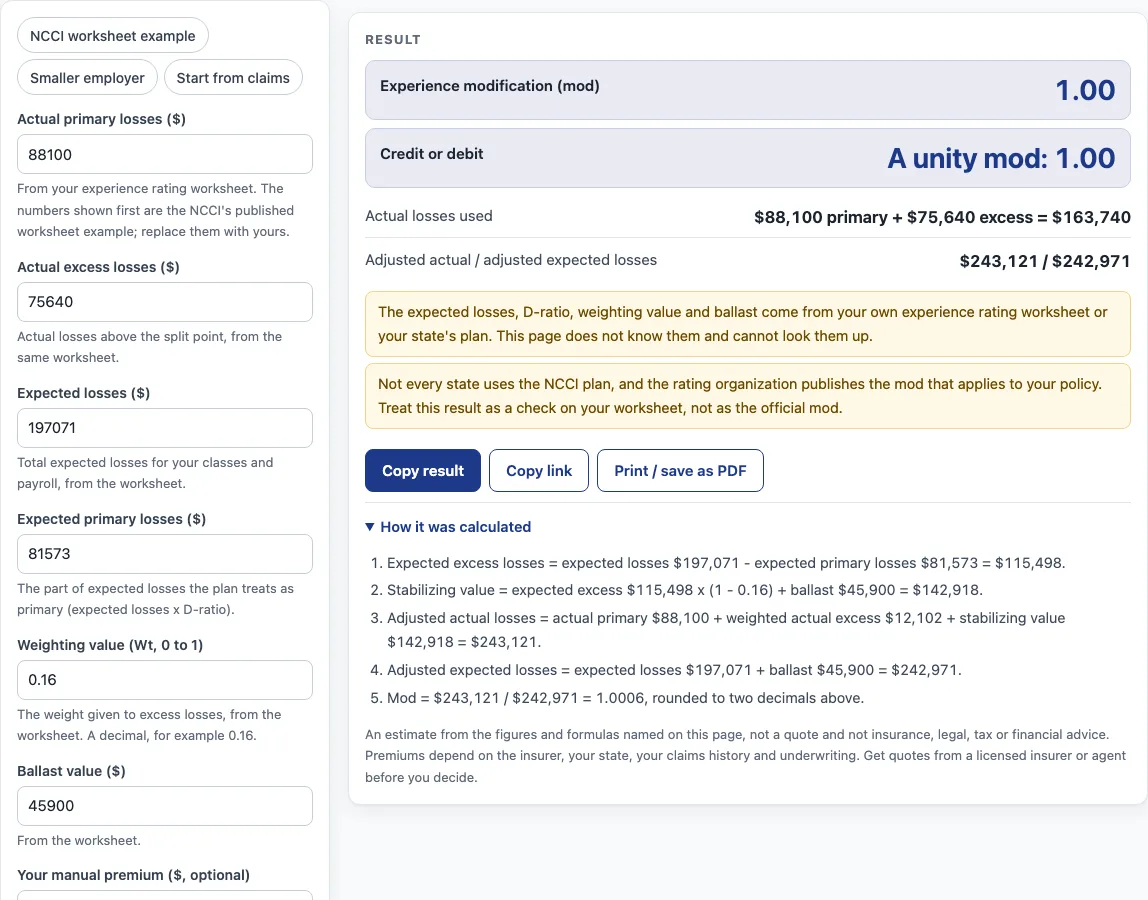
How to use the experience modification rate calculator
- From your experience rating worksheet, type “Actual primary losses ($)” and “Actual excess losses ($)”. The numbers shown first are the NCCI’s published worksheet example.
- Type “Expected losses ($)”, “Expected primary losses ($)”, the “Weighting value (Wt, 0 to 1)” as a decimal such as 0.16, and the “Ballast value ($)”.
- Optionally type “Your manual premium ($, optional)” to see the premium after the mod.
- Or open “More options” and type “Claims, one per line (optional)”. Add the letter m after a medical-only claim, for example “30000 m”. Then the two actual-loss fields are ignored.
- In “More options” set the “Split point ($)” and the “State accident limitation ($, optional)” for your state.
- Read “Experience modification (mod)” and “Credit or debit”, then the steps underneath.
- The chips “NCCI worksheet example”, “Smaller employer” and “Start from claims” load sample numbers.
Everything updates as you type, and the address bar keeps your settings, so you can copy the link or print the result. To see how one change moves the mod, edit a single number, for example the actual primary losses, and read the mod again. The steps under the result show each part of the formula, and the warnings remind you that the worksheet values come from your rating organization. Change the weighting value to see how much weight excess losses carry.
What is the experience modification formula?
NCCI’s “ABCs of Experience Rating” describes a split rating plan. Each ratable loss is split at a state-approved split point: the part up to it is primary, the part above is excess. The mod is adjusted actual losses divided by adjusted expected losses. Written out, mod = (Ap + W x Ae + (1 - W) x Ee + B) / (E + B), where Ap is actual primary losses, Ae actual excess losses, E expected losses, Ee expected excess losses (expected losses minus expected primary losses), W the weighting value and B the ballast. The ballast keeps the mod from shifting too far from 1.00, and the weight on excess losses is small for small employers.
Does the worked example match NCCI’s?
Yes. NCCI’s worksheet example has actual primary losses of $88,100, actual excess losses of $75,640, expected losses of $197,071, expected primary losses of $81,573, a weighting value of 0.16 and a ballast of $45,900. Expected excess losses are $115,498. The stabilizing value is $115,498 x (1 - 0.16) + $45,900, about $142,918. Adjusted actual losses come to about $243,120 and adjusted expected losses to $242,971, so the mod is 1.00. This page shows $243,121 because it adds unrounded amounts; NCCI’s lines are rounded.
How are claims split and capped?
With claims typed in, the page limits each loss to the state accident limitation, takes the first part up to the split point as primary and the rest as excess. In NCCI’s example a $500,000 loss with a $200,000 limit is $18,500 primary and $181,500 excess, and a $5,000 loss is all primary. A medical-only claim counts 30% of both parts: a $30,000 claim gives $5,550 primary and $3,450 excess. The example claims in the “Start from claims” chip give a mod of 0.86.
Is this the official mod?
No. The rating organization computes and publishes the mod for your policy, and not every state uses the NCCI plan. NCCI’s document says 39 jurisdictions have approved it and that independent rating organizations in Minnesota and Wisconsin take part only for employers with exposure in two or more participating states. Use this page to check a worksheet or to see how a change in losses moves the mod. It is an estimate only; ask your insurer or agent about your policy.
What do the premium and the other optional boxes do?
“Your manual premium” multiplies by the mod. In the “Smaller employer” chip the mod is 1.12, so a $50,000 manual premium becomes $56,000. The “Split point” and “State accident limitation” boxes only matter when you type claims. The page rounds the mod to two decimals, as NCCI’s example does, and shows the unrounded value in the steps.
Sources (checked 19 October 2026): ncci.com
Worked examples
| Input | Result |
|---|---|
| actual primary $88,100, excess $75,640 | mod 1.00 |
| actual primary $60,000, excess $30,000 | mod 1.12 |
| actual primary $47,550, excess $266,450 | mod 0.86 |
Calculated by the tool above; open it with the same values to see each step.
Frequently asked questions
Where do the expected losses, weighting value and ballast come from?
From your experience rating worksheet. They depend on your classes, payroll and state, and this page cannot look them up.
What counts as a credit mod and a debit mod?
NCCI describes a mod below 1.00 as a credit, above 1.00 as a debit and exactly 1.00 as unity. The page labels the result that way and nothing more.
Why is the page’s total $243,121 and NCCI’s $243,120?
NCCI rounds the lines it prints. The page adds the unrounded numbers, and both give a mod of 1.00.
What does the 30% for medical-only claims mean?
NCCI’s example counts only 30% of the primary and excess parts of a medical-only claim in the mod. Type “m” after the amount to apply it. Check your state’s rules.
Is anything I type uploaded?
No. The calculation runs in your browser, and nothing you enter leaves your device.
What is the split point?
It is the state-approved amount that divides each loss into primary and excess. NCCI’s example uses $18,500. Use the number from your worksheet or your state’s plan, not this example.
Can I use it to see what a different loss would do to my mod?
Yes. Change the actual losses, or add a claim in “Claims, one per line”, and read the new mod. The worksheet values for expected losses, weighting value and ballast stay as you typed them, which is only an approximation of what the rating organization would calculate for a new year.
Other workers’ compensation and business insurance pages:
- Workers comp calculator - premium from payroll, rates and a mod you already know.
- Workers comp insurance cost - published workers’ compensation figures.
- Business insurance costs - every business coverage page.
- Contractor insurance cost - published figures for a trade with high workers’ compensation costs.
- Roofing insurance cost - another high-risk class.