COI Expiration Calendar
List each vendor with the date their insurance expires. Download a calendar file that reminds you 30, 14 and 7 days ahead, or a CSV for a spreadsheet.
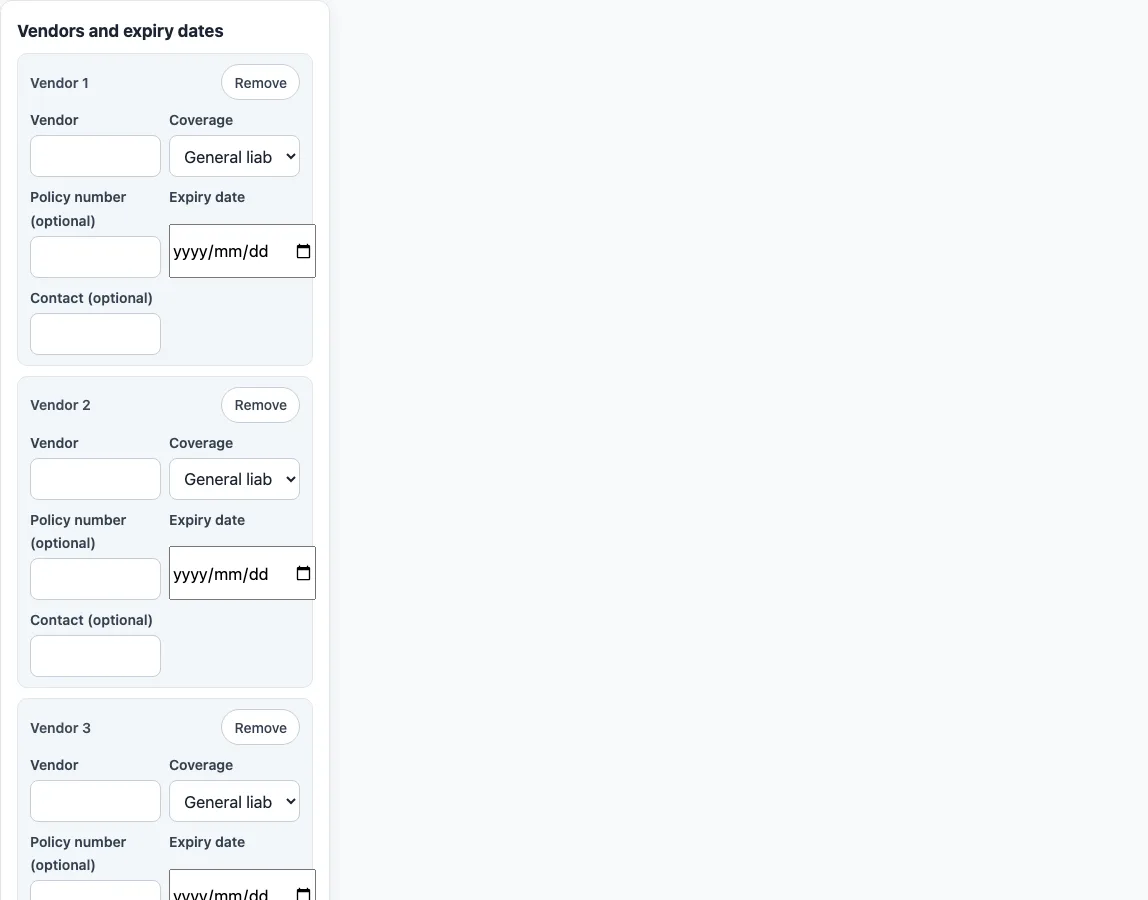
How to use the COI expiration calendar
- Click “Add row” for each vendor, or click “Load example rows” to see a filled table of invented vendors first.
- Type the vendor name, then choose a type in “Coverage”. Add a “Policy number (optional)” and a “Contact (optional)” if you have them.
- Enter the date in “Expiry date”. Take it from the policy dates on the certificate, and check it against the certificate itself.
- To load many rows at once, paste CSV text into “CSV text” and click “Import CSV”, or choose a file with “Or choose a .csv file”. The columns are vendor, coverage, policy number and expiry date. A header row is optional.
- Under “Reminders”, keep or untick “Remind me 30 days before”, “Remind me 14 days before” and “Remind me 7 days before”. Then set “Reminder time” and “Calendar name”.
- Check the list under “Summary, soonest expiry first”. Expired and soon-due rows are shown first, each with a text badge.
- Click “Download calendar (.ics)” to save the reminders file, or “Download CSV” for a spreadsheet. “Copy CSV” copies the same table to the clipboard.
The tool holds up to 200 rows. Rows with no vendor name, or with a missing or unreadable date, are left out of both downloads. Reminders are only as good as the dates you type, and calendar apps show alarms on all-day events in different ways.
How do I track certificate of insurance expiration dates?
A certificate of insurance is a document that gives evidence of certain general types of coverage and limits that were bought, as the IRMI glossary puts it. The dates on it come from the policies it refers to. The standard ACORD 25 layout gives each coverage its own line with a policy number and policy effective and expiration dates, so one vendor can have several dates to track. A simple method is one row per coverage line: vendor, coverage type, policy number and expiry date. Update the row each time a new certificate arrives, because the list is only as current as the last certificate you read.
What do the reminders in the .ics file do?
The .ics file is a standard calendar file. Each vendor gets an all-day event on its expiry date. For each reminder you ticked, the event gets an alarm at the chosen time, 30, 14 or 7 days before the expiry date. An alarm whose date has already passed is left out. A certificate that expires in 10 days therefore gets only the 7-day alarm, and an expired one gets none. Apps differ in how they show alarms on all-day events, so test one reminder in your own calendar before you rely on the file.
Can I keep a spreadsheet of vendor insurance expiry dates?
Yes. Click “Download CSV” to get a file with the columns Vendor, Coverage, Policy number, Expiry date (ISO), Days left, Status, Contact and Notes. Days left and Status are worked out on the day you download the file, so download it again when you need current numbers. A certificate also does not tell you everything about the policy. It says the insurance is subject to the terms, exclusions and conditions of the policies, and that the limits shown may have been reduced by paid claims. The spreadsheet can hold the dates and names you copied, but the policy itself still decides what is covered.
Sources (checked 16 October 2026): IRMI glossary: certificate of insurance · Printed text of a blank ACORD 25 certificate
Frequently asked questions
Is my vendor list stored anywhere?
No. The table exists only in your browser tab. Nothing is uploaded or saved on a server, and reloading the page clears every row, so download the CSV or the .ics file before you leave.
Does the calendar file replace checking the certificate?
No. The reminders use only the dates you typed. Check each certificate for its policy dates and coverage, because a mistyped date gives a reminder on the wrong day.
Why is a vendor missing from my downloads?
Rows with no vendor name, or with an expiry date that is missing or not a valid date, are left out of both the .ics and CSV downloads. The summary shows a message for each one so you can fix it.
Can I import a CSV that I exported earlier?
Yes. The tool’s own CSV export imports cleanly, and the apostrophe it adds in front of cells that start with = + - @ is removed on import. Dates must be written as MM/DD/YYYY or YYYY-MM-DD.
Why are some reminders not in my calendar?
Reminders whose date has already passed are not added to the file. An expired certificate therefore gets no alarm. Your calendar app may also show the alarm at a different time from the one you chose.
Related pages on this site:
- Certificates of insurance - the hub for this site’s certificate tools.
- ACORD 25 checker - check the boxes on a certificate before you log its dates.
- Insurance requirements letter - set out the coverage you want shown.
- How to read a certificate - find the policy dates to type here.
- Certificate holder vs additional insured - being named on a certificate is not the same as having the status.
- Additional insured endorsement - the endorsement that gives that status.
- Waiver of subrogation - what the SUBR WVD column shows.
- Certificate of insurance sample - a made-up certificate explained part by part.
- Primary and noncontributory - which policy responds first, and what the common wording requires.