Certificate of Insurance Template
Fill in who needs the certificate and what it must show. The page writes the request email to send to your agent or broker.
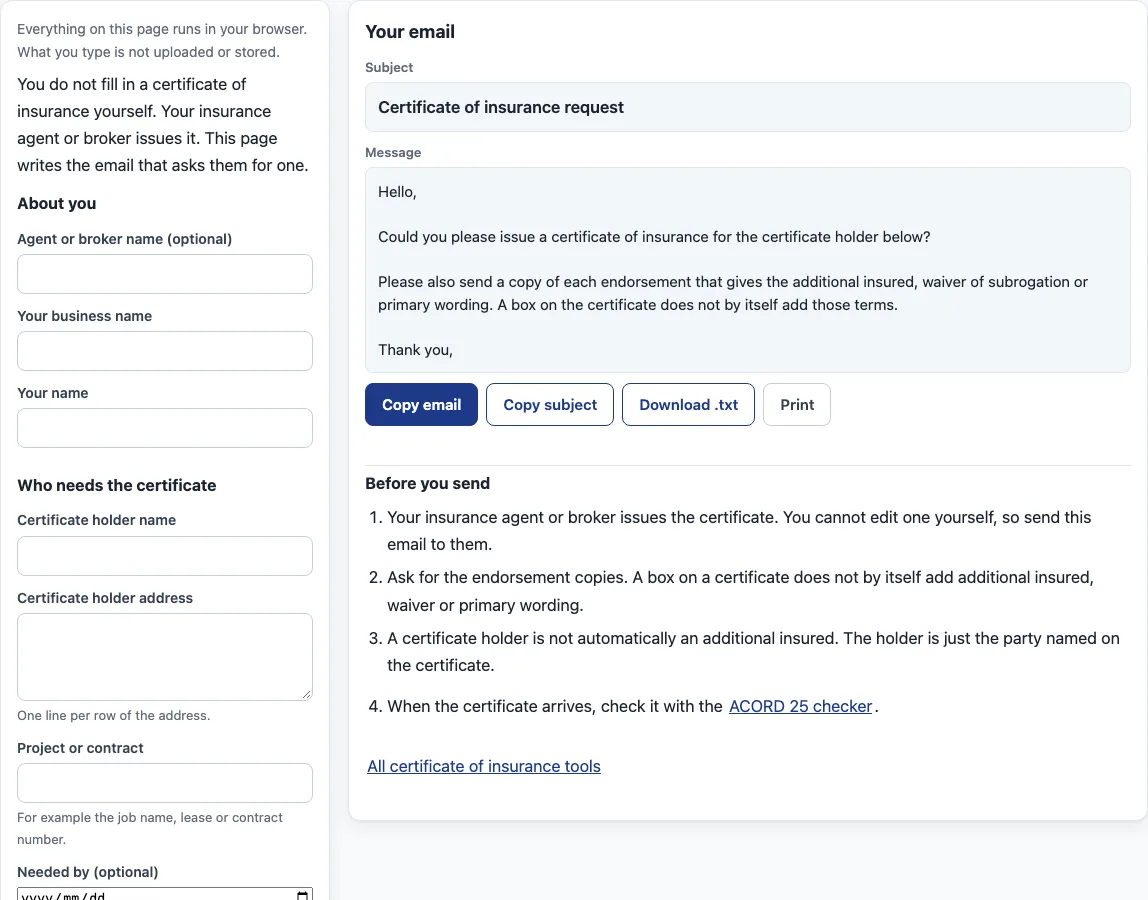
How to use this page to request a certificate of insurance
- Under “About you”, enter your business name and your name. Add the agent or broker name if you have one. That field is optional.
- Under “Who needs the certificate”, enter the “Certificate holder name” and the “Certificate holder address”, one line per row of the address. Enter the job name, lease or contract number under “Project or contract”, and pick a date under “Needed by (optional)”.
- Under “What the contract asks for”, check only the options your contract asks for. These are “Add the certificate holder as an additional insured” (with “Ongoing operations” and “Completed operations” below it), “Waiver of subrogation on general liability”, “Waiver of subrogation on workers’ compensation” and “Primary and non-contributory wording”.
- If your contract gives description wording or limits, copy the exact words into “Description wording the contract requires (optional)” and the figures into “Limits the contract asks for (optional)”.
- Leave “Ask for a copy of each endorsement” checked. Check “Ask whether the holder gets notice of cancellation” if you want that question in the email.
- Check the subject and message under “Your email”. Then click “Copy email”, “Copy subject”, “Download .txt” or “Print”.
- Send the email to your agent or broker yourself. The page does not send anything.
The tool only writes the email. It does not check your policy or your current coverage. Checking a box here changes the words in the email, not your policy.
Is there a certificate of insurance template I can fill in?
No. A certificate of insurance is issued by the insurance agent or producer, and you cannot edit one yourself. The IRMI glossary defines it as a document that gives evidence that certain general types of insurance coverages and limits have been bought. It is issued on behalf of the party that has to show it carries insurance.
The standard ACORD 25 form states that it is issued as a matter of information only. It confers no rights on the certificate holder and does not amend, extend or alter the coverage of the policies. A blank form cannot change that, and neither can this page.
How do I request a certificate of insurance?
Write to your agent or broker and name the certificate holder, the project or contract, and any wording the contract asks for. A written request keeps a record of exactly what you asked for.
A certificate is not a policy. The NCOIL Certificates of Insurance Model Act says a certificate does not give anyone new rights beyond what the policy expressly provides. NCOIL writes a model for state legislatures, not a law in every state, so state law varies. One city’s checklist asks for the contracting party as the named insured, current policies, limits that reflect the contract, and the holder named as the contract requires. That checklist is one city’s reference, not a universal rule.
Why ask for endorsement copies?
Because a certificate does not add coverage by itself. An additional insured is not automatically an insured. The holder is added at the named insured’s request, usually with an indemnity agreement, and it gets the rights of an insured under the indemnitor’s general liability policy. The IRMI glossary entry for additional insured describes this. An additional insured’s rights depend entirely on the terms of the specific endorsement, so one law firm’s checklist advises asking to review those terms before you sign. Ask for a copy of each endorsement that gives additional insured, waiver of subrogation or primary wording, and check that the policy number is printed on it.
Sources (checked 16 October 2026): IRMI glossary · NCOIL model act · ACORD 25 printed text · IRMI additional insured · Taft Law checklist · City of San Diego insurance checklist
Frequently asked questions
Is there a certificate of insurance template I can fill in?
No. Your agent or broker issues the certificate, and you cannot edit one yourself. Send them a request instead.
How do I request a certificate of insurance?
Email your agent or broker with the holder’s name and address, the project or contract, and any wording or limits your contract asks for. This page writes that email for you to copy or download.
What should I include in a certificate request?
Include the certificate holder’s full name and address, the project or contract name, and the date you need the certificate by. Add the description wording and limits from your contract, and ask for a copy of each endorsement that gives additional insured, waiver of subrogation or primary wording.
Why ask for endorsement copies?
A certificate does not add coverage or change a policy. Additional insured, waiver and primary wording sit in the policy or in an endorsement, so the endorsement is the document to check.
Is what I type uploaded?
No. The tool runs in your browser, and nothing you type is uploaded or stored.
Can I send the request by clicking a button on this page?
No. The page does not send anything. Copy the email or download it and send it yourself, so that no address or name you typed leaves your browser.
Does a certificate request change my policy?
No. A request only asks your agent or broker to issue a certificate. Whether the policy gives the holder additional insured, waiver or primary wording depends on the policy and its endorsements.
Related pages on this site:
- Certificates of insurance - the hub for every certificate tool here.
- ACORD 25 checker - check a certificate you have received, box by box.
- Insurance requirements letter - list the coverage a contract needs.
- Certificate of insurance sample - see a filled-in certificate.
- How to read a certificate of insurance - what each box says.
- Additional insured endorsement - when a holder needs endorsement wording.
- Waiver of subrogation - what the waiver box means.
- Certificate holder vs additional insured - why being named on a certificate is not the same as being insured under the policy.
- Primary and noncontributory - which policy responds first, and what the common wording requires.