ACORD 25 Form Checker
Choose your certificate PDF, check what was read, type the limits your contract asks for and see which lines match, fall short, are missing or expire soon. The file stays on your device.
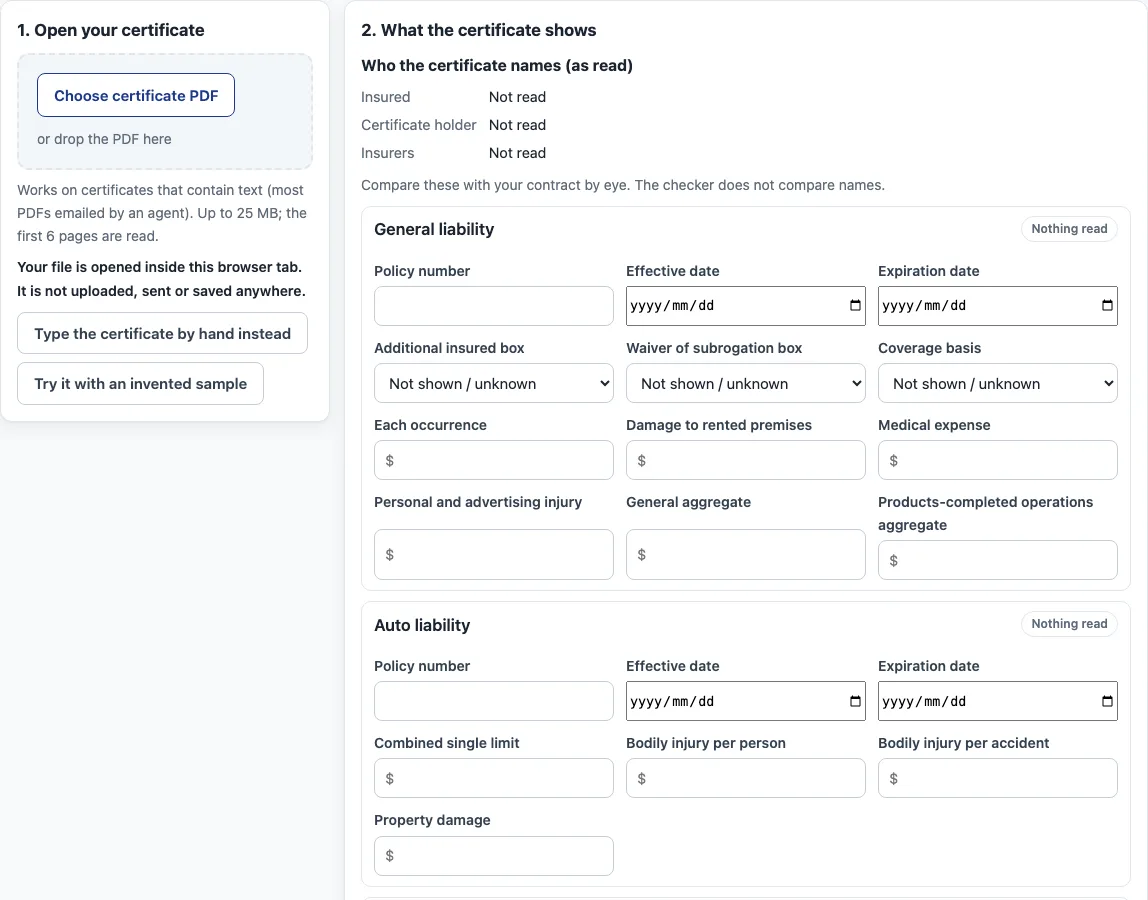
How to use the ACORD 25 Form Checker
- Click Choose certificate PDF, or drop the PDF on the page. The file opens in this browser tab. To try the tool first, click Try it with an invented sample. If your file is a scan, click Type the certificate by hand instead.
- In 2. What the certificate shows, check each coverage row: the policy number, the dates, the additional insured and waiver of subrogation boxes, and the limits. Correct any value that is wrong, since every value is editable.
- In 3. What your contract requires, turn on Require this coverage for each line and type the minimum. Set Check as of and Flag expiry within (days). Click Fill example requirements to see how the layout works, or Clear requirements to start again.
- Read 4. Result. Each row shows one status: Matches, Below requirement, Not found, Expired, Expires in N days, or Not yet in force. Click Copy results, Print results or Download CSV to keep a record.
The tool reads PDFs that contain text, using pdf.js (an Apache-2.0 library that runs in your browser), and it reads fillable form fields. A scanned PDF has no text, so the page says so and offers manual entry. The tool cannot see endorsements. It uses the word “matches” only, because a matching number does not show that a certificate is acceptable.
What does an ACORD 25 form show?
An ACORD 25 form shows who holds the certificate, who is insured, which insurers wrote the coverage, and which limits and dates apply. The printed form has boxes for the producer, the insured, insurers A to F with their NAIC numbers, and a certificate number. Its coverage table lists, for each line, the insurer letter, the type of insurance, the ADDL INSD and SUBR WVD boxes, the policy number, the policy dates and the limits.
The form says it is issued as a matter of information only. It confers no rights on the certificate holder and does not amend, extend or alter the policies. The NCOIL model act on certificates says the same in other words: a certificate is not a policy, and it gives no new rights beyond what the policy expressly provides. State law varies, and the model act is not law in every state.
How do I check an ACORD 25 against contract requirements?
Compare each number and box on the certificate with your contract, then ask for the endorsements that back those boxes. As an example, one city’s purchasing checklist asks for the contracting party’s full name as insured, current policies, limits that reflect the contract, an occurrence box marked for general liability, and an authorized representative’s signature. The same checklist expects additional insured, primary and noncontributory, and waiver of subrogation coverage to appear in the endorsements or policy pages, separate from the certificate, with the policy number printed on each.
An additional insured’s rights depend on the terms of the specific endorsement, so ask to review those terms before you sign. Invented example: a contract asks for $1,000,000 each occurrence, and the certificate shows $500,000. The result reads Below requirement by $500,000. The checker compares numbers and marks only, not names, so check the holder and insured names by eye.
Where do I get a fillable ACORD 25?
Ask your insurance agent or broker. The agent issues the certificate, so the agent can send you the PDF your contract needs. This site does not provide or host the form. If the PDF has fillable fields, the checker reads them. To see how the results look before you have a certificate, click Try it with an invented sample. Its names and numbers are made up.
Sources (checked 16 October 2026): NCOIL Certificates of Insurance Model Act · Printed text of a blank ACORD 25 form, US National Park Service · Taft Law, Insurance Issues in Commercial Contracts · City of San Diego, Insurance Checklist
Frequently asked questions
What does an ACORD 25 form show?
It shows who holds the certificate, who is insured, which insurers wrote the coverage, and the policy numbers, dates and limits for each line. It confers no rights on the holder and does not change the policies.
How do I check an ACORD 25 against contract requirements?
Compare each limit, date and box with your contract, then ask for copies of the endorsements. Turn on each requirement in panel 3 to see whether the certificate shows a match.
Where do I get a fillable ACORD 25?
From your insurance agent or broker, who issues the certificate. This site does not provide or host the form.
Is my certificate uploaded?
No. The file is opened inside this browser tab. It is not uploaded, sent or saved anywhere.
Can the checker read endorsements?
No. A certificate does not show the endorsements themselves, so the checker cannot see them. Ask your agent for copies of any endorsement your contract requires.
Which certificate layouts can the checker read?
It looks for the coverage table headings and the limit labels of the usual text-PDF layout. A different layout may be read only in part, which is why every value on the page is editable and you can type the certificate by hand.
Does the checker say a certificate is compliant?
No. It compares the numbers you type with the numbers and marks it reads from the certificate, and reports Matches, Below requirement, Not found, Expired, Expires in N days or Not yet in force. Whether a certificate satisfies your contract is for you, your agent or your attorney to decide.
Related pages on this site:
- Certificates of insurance - the hub for every certificate tool on this site.
- How to read a certificate of insurance - a walk through each box before you compare numbers.
- Insurance requirements letter - write down what your contract asks for first.
- Certificate holder vs additional insured - why the two boxes mean different things.
- Additional insured endorsement - when you need the endorsement itself.
- Certificate of insurance sample - a made-up certificate explained part by part.
- Waiver of subrogation - what the term means and how to spot it in contract wording.
- Primary and noncontributory - which policy responds first, and what the common wording requires.